







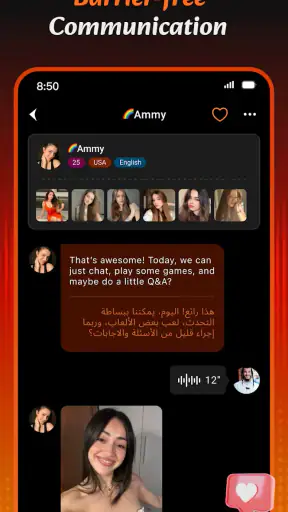


I approached Wigo Live-Live Video Chat as a social app for people who would rather meet others through live conversation than scroll through silent profiles. Its focus is straightforward: video calls, chat, live streaming, and making connections across different parts of the world. After spending time with it, my impression is that it works best when you treat it as a spontaneous social space, not as a carefully curated dating profile or a replacement for a private messaging service.
That distinction matters. The app can be entertaining when you are open to short conversations and unexpected encounters, but it also asks you to be comfortable with a less predictable social environment. I would recommend it to adults who enjoy live interaction and want to talk with people outside their usual circle. I would be more cautious about recommending it to anyone looking for a quiet, tightly controlled community, a professional networking tool, or a simple family chat app.
How Wigo Live feels in its current form
The current release is version 1.7.9, and the overall product identity is easy to understand. Wigo Team has built this as a social app rather than a general-purpose communication utility. You are not opening it mainly to organize work, send files, or keep a permanent archive of conversations. The appeal is the immediacy of seeing and speaking with people in real time.
That immediacy changes the rhythm of use. Traditional messaging apps reward people who already know whom they want to contact. Wigo Live is more suitable when you want to browse the social atmosphere, join a live interaction, or start a conversation without preparing a long introduction. In my experience, that makes the first few minutes feel more active than a normal chat application, but it can also make the experience feel less predictable.
The app belongs in the social category, and its audience is clearly adult. It carries a Mature 17+ rating, which is an important part of the decision rather than a minor store detail. I would not install it on a teenager’s device simply because the interface looks approachable. Adults should also remember that an age label does not remove the need for personal boundaries, careful sharing, and sensible behavior around strangers.
Its reach is already substantial, with over five million installs and an average rating of 4.4 from around ninety-seven thousand ratings. Those figures suggest that the concept has found a real audience, although they do not guarantee that every conversation will suit every user. Live social products are especially dependent on timing, language, personality, and the people available when you open the app.
The best way to use it for the first time
I would begin with a short session rather than committing to a long evening. Explore the main social areas, notice how quickly conversations begin, and decide whether the pace feels comfortable. The mistake many new users make with live-chat apps is treating the first interaction as a test they must pass. It is better to view the first session as a way to understand the culture of the app.
Keep your opening conversation light. Talk about hobbies, music, travel, food, or the reason you opened the app, but avoid giving away your address, workplace details, financial information, or personal contact channels immediately. A useful rule is to ask yourself whether you would be comfortable with the information being repeated to someone else. If the answer is no, it does not belong in an early conversation.
There is also a practical benefit to setting a time limit. Because live interaction can be more absorbing than ordinary scrolling, a short planned session helps you judge whether you are enjoying the conversations or simply continuing because the next one might be better. That small habit makes the app feel more like a tool you control instead of a stream that controls your attention.
What the latest version means for existing users
Version 1.7.9 is the clearest marker of the app’s current state, but I would not read a version number as proof of a particular feature unless the change is visible in the app itself. What I can say is that Wigo Live is being maintained as an active product rather than sitting untouched after launch. It was released on October 25, 2024, so its development story is still relatively recent compared with long-established messaging platforms.
For someone already using it, the practical question is whether the current version preserves the app’s central promise: quick access to video-based social interaction, chat, and live spaces. It does. The product has not drifted into a completely different category. That consistency is useful because existing users do not have to relearn the reason they opened it in the first place.
At the same time, a newer release does not automatically solve the deeper challenges of live communities. A smoother interface or continued maintenance cannot guarantee that every room will be welcoming, that every match will be interesting, or that conversations will happen in your preferred language. The quality of a social network depends partly on its active users, and that changes throughout the day.
If you have used the app before and are returning after an update, I would pay attention to three things: whether navigation still feels immediate, whether chat and video transitions remain comfortable on your device, and whether the people you encounter match the kind of interaction you want. Those are more meaningful tests than simply noticing that the version number has changed.
A realistic everyday scenario
Imagine finishing work on a weekday evening with half an hour available before dinner. You are not looking for a formal event or a long message thread; you simply want a little conversation. Wigo Live can fit that moment better than a conventional messenger because you can enter a live social setting without first arranging a meeting with someone you already know.
You might start with text chat to see whether the other person is friendly and responsive before moving into video. That is a workflow I prefer because it gives both people a small amount of context. If the conversation feels awkward, repetitive, or too personal, ending it early is reasonable. There is no obligation to turn a brief encounter into a continuing relationship.
Another useful scenario is language practice. A user who is comfortable making mistakes aloud may find live conversation more valuable than typing translations back and forth. The trade-off is that spontaneous speech gives you less time to edit yourself. I would use it for casual practice and cultural exchange, not for sensitive discussions where misunderstanding could cause real problems.
For streamers, the attraction is different. Live broadcasting can create a sense of presence that ordinary posts lack. You can respond to people as they arrive and shape the mood in real time. The downside is that live content demands more attention and emotional energy. Before starting a stream, decide what topics are off-limits and how you will handle a viewer who becomes intrusive. Planning those boundaries in advance is more useful than trying to invent them while broadcasting.
Where it stands against familiar alternatives
Compared with established messaging apps, Wigo Live is more discovery-oriented and less dependent on an existing contact list. A normal messenger is usually strongest when you already know the people you want to reach. It offers continuity, predictable contacts, and conversations that can wait until later. Wigo Live is stronger when the point is meeting someone new or joining a live social moment.
Compared with video meeting tools, the difference is even clearer. Meeting platforms are built around invitations, schedules, and a known group. Wigo Live is built around casual social access. That makes it less appropriate for a class, a client call, or a family gathering, but potentially more appealing when you want an informal conversation without organizing a calendar event.
It also differs from text-first social networks. Written platforms give you time to think, edit, and choose exactly how much of yourself to reveal. Wigo Live places more weight on presence, voice, and immediate reactions. If you communicate best through carefully written posts, you may find the live format tiring. If text feeds feel distant and repetitive, the video element may be the reason to try it.
There is a trade-off with specialized live-streaming services as well. A large streaming platform may offer a more established creator culture and a stronger sense of programming, while Wigo Live feels more centered on direct social contact. I would choose Wigo Live for personal interaction and spontaneous friendship-building, not when my main goal is watching polished entertainment from established creators.
Small choices that improve the experience
One of the most useful habits is to separate discovery from trust. A friendly first conversation is not the same thing as a reliable friendship. I would keep early contact inside the app while learning how someone behaves over time. Moving immediately to another platform can make blocking, reporting, or simply stepping away more complicated.
A second tip is to use text as a filter rather than treating video as the default first step. Video can be the most engaging part of the service, but it also reveals more than many people realize: your surroundings, your routine, and details visible behind you. A neutral background and a quick check of the camera frame are simple precautions that make a meaningful difference.
A third insight is that the app’s value depends heavily on your willingness to leave unproductive interactions. Some users stay because they feel rude ending a conversation. In a live social app, that can turn a pleasant break into an exhausting one. If the exchange is uncomfortable, repetitive, or pressuring you to share more than you want, leaving is not a failure of the app or of your social skills. It is the correct use of your control.
For live streaming, I would prepare a few conversation prompts before going on camera. This avoids the common problem of filling silence by revealing personal information. Questions about favorite places, hobbies, films, or everyday routines keep the discussion moving without forcing you to discuss private matters. It also gives viewers a clearer idea of what kind of stream they have joined.
Costs, access, and practical expectations
The app is free to install, which makes trying it relatively easy. It also includes in-app purchases ranging from ninety-nine cents to ninety-nine dollars and ninety-nine cents per item. I would treat those purchases as optional spending that needs attention, especially because live social environments can make small transactions feel like part of the conversation rather than a separate decision.
My advice is to decide your spending limit before buying anything. Do not purchase simply because a conversation creates pressure or because you want to impress another user. If an interaction is valuable, it should not require you to spend beyond what you intended. The free starting point is enough to judge whether the basic social experience suits you before considering any paid element.
Device compatibility is also reasonably broad: the app supports Android version 7.0 and later. That helps people using older phones, although compatibility alone does not tell you how comfortable video will feel on every device. Camera quality, microphone behavior, battery condition, and connection stability can all affect a live conversation. If video feels choppy, first check your own setup before deciding that the entire service is at fault.
I would also expect live video to use more battery and data than ordinary text chat. That is not unique to this app, but it changes how you should use it away from home. A short conversation on a stable connection is one thing; leaving a stream running for a long period is another. If your mobile plan is limited, monitor your usage rather than assuming that a free app means a free connection.
Who should try it, and who should skip it
Wigo Live is a good fit for adults who enjoy meeting strangers, can handle quick changes in conversation, and are comfortable appearing on camera. It may also suit people who feel that ordinary social feeds have become too passive. The combination of chat, calls, and live interaction gives you more ways to participate than simply liking posts.
I would especially consider it for someone who has recently moved to a new place and wants low-pressure social contact, or for a person interested in hearing perspectives from outside their normal community. It can be useful for casual language practice and for users who prefer talking over writing. The strongest benefit is not a particular feature; it is the chance to create a social moment without needing an established network first.
I would skip it if you dislike being seen or heard by unfamiliar people. I would also choose a conventional messenger if your priority is dependable contact with family, work colleagues, or close friends. People who want carefully moderated, topic-specific communities may be happier with a service designed around those interests rather than a broad live-social format.
Parents should not mistake the app’s accessible presentation for a child-friendly environment. The Mature 17+ rating should guide the decision, and younger users should not be encouraged to experiment with it unsupervised. Adults who are vulnerable to impulsive spending or who find it difficult to disengage from live interactions should set firm limits before using it.
What still needs careful attention
The biggest limitation is the same quality that makes the app interesting: unpredictability. You cannot guarantee that the next conversation will be thoughtful, relevant, or respectful. That makes the service more exciting than a fixed contact list, but it also means you may spend time filtering rather than connecting.
Video adds another layer of friction. Some people are confident in person but uncomfortable on camera, while others may not have a quiet space or reliable connection. A text-first alternative is better when you need privacy, when you are in a noisy environment, or when you want time to consider your words.
There is also a difference between meeting people and building lasting friendships. Wigo Live can open the door, but the app cannot do all the work afterward. A meaningful connection still depends on consistency, mutual respect, and shared interests. If you expect every interaction to become a close relationship, the service may feel disappointing even when it is functioning exactly as intended.
Privacy requires active judgment from the user. I would avoid showing documents, personal mail, identifiable views from home, or anything that exposes your routine. I would also be wary of anyone who quickly asks for money, private images, login details, or a move to a less protected channel. Ending the conversation is the safest response to pressure, and no entertaining chat is worth ignoring that warning.
What I would watch as the app develops
Because the product is still relatively young and currently sits at version 1.7.9, I would watch how Wigo Team balances growth with the quality of everyday interactions. More users can create more opportunities, but a larger audience also makes consistency, safety tools, and clear community expectations increasingly important.
I would also look for improvements that make discovery more useful without taking away spontaneity. Better ways to find compatible conversations, clearer controls around live participation, and smoother movement between chat and video would all matter more to me than decorative changes. The strongest future direction would help users spend less time sorting through unsuitable interactions and more time finding people with genuinely shared interests.
For existing users, the important question is whether updates continue to improve the practical experience rather than merely adding reasons to stay longer. I would value changes that make it easier to manage boundaries, leave conversations, and understand spending. Those details may be less visible than a new social feature, but they have a greater effect on whether the app remains comfortable over time.
My final view is positive but measured. Wigo Live offers a clear alternative to passive feeds and contact-list messaging, and its live format can make social discovery feel immediate. The free entry point, broad Android support, and active audience make it easy to test. Still, the app rewards users who bring good judgment, realistic expectations, and a willingness to end interactions that do not feel right.
My recommendation is to try it as a controlled social experiment, not as an automatic source of friendship. Give it a short session, start with text when you are unsure, protect your personal details, and decide your spending boundaries before live interaction becomes absorbing. If you enjoy spontaneous video conversation, Wigo Live may become a lively addition to your social routine. If you want predictable contacts, deep moderation, or private communication with people you already know, another category of app will serve you better.


